

Memory & Learning
brAIn keeps one small, human-readable document about your home at /config/.brain/memory/memory.md — preferences, entity nicknames, household patterns, device quirks. It’s what turns “turn on the beacon” into the office lamp, and every surface in the add-on reads and writes it: the terminal, voice, insight runs, study sessions.
The whole design answers one question: what, exactly, has it learned? If you can’t point at a line and say “it knows that”, it isn’t memory.
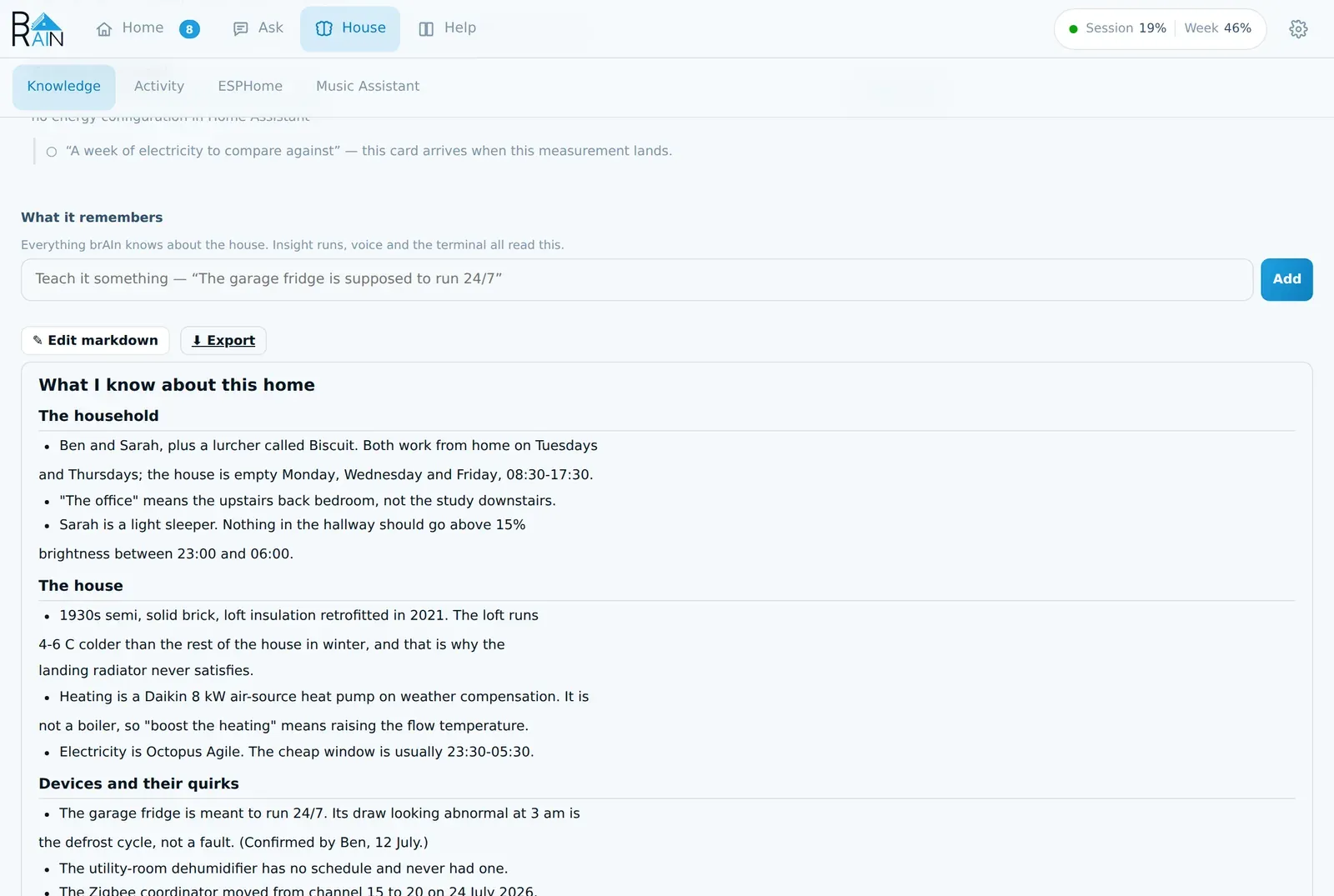
What ends up in it
Real lines from a real document — the kind of thing that changes an answer rather than padding a profile:
- “The office” means the upstairs back bedroom, not the study downstairs.
- Sarah is a light sleeper. Nothing in the hallway should go above 15% brightness between 23:00 and 06:00.
- Heating is an 8 kW air-source heat pump on weather compensation. It is not a boiler, so “boost the heating” means raising the flow temperature.
- The garage fridge is meant to run 24/7. Its draw looking abnormal at 3 am is the defrost cycle, not a fault.
- Never rename an entity_id without asking — several are referenced in a Node-RED flow I cannot see.
That last kind matters more than it looks: memory is where you put the rules you’d otherwise have to repeat in every request.
One document, one writer
| What | Where | Is it memory? |
|---|---|---|
memory.md |
/config/.brain/memory/ |
Yes. The canonical document — plain markdown, user-editable, capped at memory_max_kb (default 32 KB, range 1–64). |
voice.md |
/config/.brain/memory/ |
Derived. A ≤2 KB distillate spliced into voice prompts. Don’t edit it; it’s regenerated. |
inbox/ |
/config/.brain/memory/ |
No — a queue. Candidate facts waiting to be folded in. |
| Hypotheses | /config/.brain/memory/ |
No — a queue. Open guesses awaiting a yes/no. |
| Change log | /config/.brain/memory/ |
No — an audit trail, so you can see what changed and undo it. |
| Facts | Knowledge tab | An index underneath the document — the same knowledge one fact at a time, with who taught it. It follows the document; see below. |
Only the queues are ever written to directly. Nothing writes memory.md except the consolidator, which folds the inbox in once a day (or early when 20+ facts are pending), deduping, resolving contradictions newest-wins, and enforcing the size cap. One writer means no races, and it means the document stays a document rather than an append-only log.
The cap is not a speed setting. Voice reads the 2 KB voice.md distillate on every request and never the document, so shrinking memory.md buys nothing where speed is felt — the cap only decides how much brAIn can know before filing something new means dropping something old.
⇪ File into memory now on House → Knowledge runs that same pass immediately — same script, same safety checks. The button starts the pass rather than waiting for it — a consolidation takes minutes, and a web request can’t — so a banner counts the elapsed time and the tab reports the outcome when it lands. It empties Waiting to be filed, and what was in it is now in the document, which is the one place it’s read and edited from. If the pass keeps the facts instead — it does that rather than write a document it isn’t happy with — it says so, and the queue stays where it was.
Waiting to be filed is the inbox itself: every queued line, labelled with where it came from — an insight run, a voice conversation, a correction, something you typed — and the count is the length of that same list, so the two can never disagree. ✕ on a row drops it from the queue — and from the facts every run is told — and asks the consolidator for nothing, because a queued fact has by definition never reached the document.
The inbox, the hypothesis queue, and the change log are never injected into prompts. They’re plumbing, not knowledge.
A consolidation can’t quietly erase what it knows
A pass that would drop more than 60% of the document’s content lines is refused outright,
and any failure leaves memory untouched with the inbox still pending. Nothing is ever
half-written: both memory.md and voice.md are replaced atomically or not at all.
A pass gets 480 seconds — it rewrites the whole document plus the voice distillate — and a
failure is reported by name: a timeout says it timed out, anything else carries Claude’s own
last line. An answer over the size cap is retried once with the measured excess fed back
(“drop the oldest and lowest-value facts until it fits”) before failing with a message that
names memory_max_kb.
The Knowledge tab
House → Knowledge opens with this morning’s brief and the seven things brAIn measures (see Measurements), then three short lines saying how the next three sections differ — because all three hold “things brAIn has learned”:
| Section | What it is |
|---|---|
| Memory document | brAIn’s written summary of your home, editable in place. Correcting it here is how you stop brAIn saying something. |
| Waiting to be filed | The queue: things learned and not yet folded into the document. File into memory now files them. |
| Facts brAIn has learned | The same knowledge one fact at a time, each tagged with the device, room or person it’s about, who taught it and when. |
The facts list shows every fact, not a few per device. Search it (a device’s friendly name works), narrow it with the chips — the house, rooms, devices, people, and Rules you set, which are the checks you told brAIn to stop raising — filter by who taught it, sort it newest first, oldest first, most certain first or grouped by what it’s about, and page through with Show more. See the run on a fact opens the conversation that taught it, and ✕ forgets it.
The Deep review button is here too — see Insights.
How it learns
- You tell it — say “remember that…” to a voice assistant, type a fact into the ask bar (“the garage freezer is off in winter”), run
brain memory add "…"in the terminal, or callbrain.add_memoryfrom an automation. - It notices — when a voice conversation ends, a bounded reflection pass (cheap model, no tools) extracts up to 3 durable facts: preferences, corrections, nicknames. Transient states, one-off commands, and secrets are excluded. A preference stated by somebody signed in to Home Assistant (“I like the bedroom at 19”) is remembered as theirs, not everyone’s.
- The terminal and the chat teach it too — after each turn a small, cheap run with no tools reads only what was said since it last looked, judging from your words alone, and files anything durable: a preference, a nickname, a correction. It needs either two new messages or one that plainly teaches something. Claude Code’s own “auto memory” is switched off in every brAIn session, so there is one memory and you can read all of it.
- It studies —
brain learn <topic>(or thebrain.studyservice, or/learnin the terminal) runs a deep session on one subject and files what it finds. Without a topic it picks whatever has gone stalest. During first setup, the screen lists what each study session learns as it lands. - It analyses — insight runs file their durable findings the same way, through the same inbox.
Every fact records whether it came from voice, the chat or the terminal, and the conversation it came from — so “why does brAIn think that?” has an answer you can open.
The facts underneath
Every fact that reaches the inbox is also filed as one row in a facts store, tagged with what it’s about, who taught it, when, and the run that produced it. The document is what you read and edit; the facts are what a run looks things up in:
- By room and by question. A run is handed the facts about the rooms and devices it is reading, and facts that share words with the question you asked come first — not the whole document, which on a mature house is 30 KB of things that are true and mostly beside the point. No one chatty device can fill the space.
- The same fact said two ways is stored once. Near-duplicates are merged as they arrive; facts that differ by a “not” are kept apart.
- Some facts expire. A note like “the hall sensor’s battery is at 12%” is true for a few weeks, not for ever, so notes about a device’s health expire after thirty days. Facts about an entity your house no longer has stop being used at once and are removed thirty days later — and come back if the entity does.
Forgetting reaches everything
Every time memory is filed, brAIn checks the facts against memory.md. A line you deleted
from the document, a brain memory forget, a cleared memory, the ✕ on a queued fact and
an Undo all reach what every run is told — not just the file you can see. A fact still
waiting to be filed is left alone until it has been judged.
Two kinds of fact survive a document that doesn’t quote them, because the document is a summary and not quoting something isn’t withdrawing it: your own corrections, and the rules a Not a problem made.
Rules you set, and how long an answer lasts
Pressing Not a problem on a house check’s finding writes a rule — this sensor, this check — that the check reads on its next pass. A correction can reach further (the whole device, the room, everywhere) and last for a while (until a date, a month or a season) rather than for good; wide ones are asked first. They are all listed under Rules you set. Undo, or Let brAIn raise it again, removes the rule too, and two checks marked wrong on the same sensor are two rules.
Only “Not a problem” is permanent
I’ve already fixed it, Got it after a fix, and finishing a to-do stop a finding being raised only for as long as it stays fixed. If the check finds the problem again it is raised again, saying how long it stayed away; anything else lapses after ninety days. A fixed problem coming back is news, not a decision being reopened.
What brAIn has learned about its own calls
The facts list also holds short judgements brAIn writes about where its own calls keep disagreeing with you — “Night motion on the hall landing is the cat — 4 of 4 it raised were marked not a problem.” The counts are brAIn’s arithmetic, never the model’s. A judgement never makes brAIn quieter about a leak, smoke, gas, a freeze or anything protected, is never about a person’s health, sleep or whereabouts, goes away when a later card on the same thing turns out to be real, and expires after 30 days unless renewed. Forget one with ✕ like any other fact.
Guesses, not questions
Earlier versions asked open-ended questions, which piled up unanswered and left you reading raw Q&A transcripts. brAIn instead states what it believes, phrased for a yes/no:
“The garage fridge is meant to run 24/7 — right?”
Two taps settle it, on the Findings tab — open guesses ride in the same list as findings, just under the high-stakes problems, because both are questions only the person living there can answer, and one badge counts everything waiting on a decision. House → Knowledge has no badge, because nothing on it waits on you: the queue files itself, and the document is there to read.
- ✓ Yes files it as a plain memory line. It’s now a fact like any other; the guess is gone.
- ✕ No records a dead end that is never revisited, in any wording — and offers the same optional one-sentence reason box a wrong finding does, because “no” usually means brAIn has misread something worth explaining.
- Dismiss puts it to sleep: it stays open but leaves every screen and stops counting against the limit below, so brAIn can ask something else meanwhile. Its fortnight starts again when it comes back.
The rules are enforced in code, not merely requested in a prompt — a model that ignores the budget still can’t grow the queue:
- 3 open at a time, maximum.
- 14-day expiry — an unanswered guess retires itself.
- Never re-proposed, confirmed or rejected, however it’s reworded.
When brAIn wonders why you did something by hand and three guesses are already open, it waits for a free slot before spending anything on working out the guess — and one it had already worked out is kept and offered, at no cost, as soon as a slot frees.
binary_sensor.brain_memory_waiting_on_you turns on when a guess needs an answer, with the open guesses and their ids in its attributes. That exists to be automated: a guess sitting in a panel nobody has open expires unanswered, but pushed to a phone it costs one tap. brain.answer_question answers one from Home Assistant exactly as the Findings tab’s buttons do — start the answer with yes or no; a yes is filed as known, a no closes the guess and keeps your reason as a correction.
Learning you can see from outside the panel
brain_learnedfires as a logbook event for every new fact, so “brAIn learned: the hallway sensor drops offline around 2am” appears in your home’s timeline next to lights and doors.sensor.brain_memory_facts_learned— how many things it knows.sensor.brain_memory_last_learned— the most recent one, with the text as an attribute.sensor.brain_findings_open_findings— how many findings are waiting on you, with the severity split and the texts as attributes.brain_findingfires for every newly-filed finding — and can ring your phone; see notifications.
Viewing, editing, undoing
House → Knowledge shows the document formatted, with ✎ Edit markdown for the raw file and a Teach it something box that merges a new fact straight in. Everything there is also on the command line:
brain memory list                        # what it knowsbrain memory add "Guests use the loft"   # queue a fact yourselfbrain memory inbox                       # facts awaiting consolidationbrain memory hypotheses                  # pending guessesbrain memory consolidate                 # run a consolidation pass nowbrain memory log                         # what changed recently, and whybrain memory undo 2                      # revert memory change #2 from that logbrain memory forget "the loft is warm"   # queue a line for removalbrain memory edit                        # open memory.md in $EDITORbrain memory clear --confirm             # reset (old file kept as memory.md.bak)brain memory export                      # everything learned, as one portable filebrain memory import backup.json          # fold an export back in
brain learn energy                       # study a topic nowbrain learn                              # study whatever is stalest
memory.md is yours. Edit it freely — your edits are the source of truth, and the consolidator merges around them rather than over them. brain memory log shows every change the consolidator made, in plain English, and brain memory undo <n> reverts one.
Two different undos
brain memory undo reverts a change to what brAIn knows. Plain
brain undo reverts a change Claude made to a file in your /config.
They’re separate journals, and neither can touch the other’s.
The learned home is portable
brain memory export writes one JSON file carrying everything brAIn has learned: the memory
document, the findings work list, the settled answers and the facts
store — including the rules your Not a problem presses made, so the checks you told “not
here” stay quiet on the new install. House → Knowledge’s ⬇ Export button downloads the same file
(GET /api/memory/export).
Import is CLI-only, and it is a migration, not a sync: ledgers merge with your existing
entries winning, the memory document replaces only an effectively-empty one unless you pass
--replace-memory, and importing the same file twice changes nothing the second time. The
point is that new hardware doesn’t mean starting the learning over — export on the old box,
import on the new, and brAIn picks up already knowing the house.
Services
# Queue a fact from an automation (administrators only when called by a signed-in user)action: brain.add_memorydata:  fact: "The dog gets fed at 7 and 17 — kitchen lights on then means feeding time"  confidence: high     # high | medium | low (default medium)
# Study a topic in the background; results arrive in memory, not in a responseaction: brain.studydata:  topic: "energy"      # omit to study whatever has gone stalest
Kill switches
learning: false— the master switch. Stops the reflection pass, what the terminal and chat teach, the consolidator, and study sessions. Existing memory is left untouched and still used.memory_injection: false— keep learning, stop splicing memory into voice prompts.brain memory clear --confirm— forget everything learned so far.