

Reference
Everything you might need to look up. Configure from Settings → Add-ons → BRUH Minecraft Server → Configuration.
Configuration options
Required
| Option | Default | What it does |
|---|---|---|
eula |
false |
Set to true to start. Accepts the Minecraft EULA. |
Server type & version
| Option | Default | What it does |
|---|---|---|
server_type |
paper |
paper, purpur, folia, vanilla, fabric, or forge. Paper recommended. |
minecraft_version |
LATEST |
LATEST, SNAPSHOT, or pinned (1.21.3). |
auto_update_server |
true |
Re-resolve the jar on every boot. Disable to pin. |
active_world |
default |
Which saved profile is live. See Multi-world. |
Gameplay — per world, not add-on options
Since add-on 1.8.0, gameplay settings are not global add-on options. Each world owns its own server.properties — gamemode, force-gamemode, difficulty, PVP, hardcore, whitelist, max players, view/sim distance, world-gen (level name/seed/type, structures, mobs, feature packs), online-mode, resource pack, command blocks, op level, connection throttle, idle timeout, MOTD, and everything else — edited from the panel’s Server Properties tab (or set up front by the new-world wizard). Settings are seeded with sensible defaults the first time a world boots, then they’re yours forever; switching worlds loads each world’s own settings.
- OP a player: join once, then click op next to their name on the panel’s Players tab. Ops persist per-world in
ops.json. - Offline / LAN mode: set a world’s
online-mode: falsein Server Properties — the add-on silently forcesenforce-secure-profile: false, switches Geyser to offline auth, uninstalls Floodgate, and disables Bedrock login validation. See Family mode. - Command blocks / op level:
enable-command-blockandop-permission-levelare ordinary per-world properties on the same tab. - Experiments: Mojang gates experimental content behind named feature packs — add them to
initial-enabled-packs(comma-separated, keepvanilla; recent 1.21.x examples:minecart_improvements,redstone_experiments,trade_rebalance). Experiments are baked in at world creation, so this only affects newly generated worlds — create a fresh world from the Worlds tab with the pack enabled.
Performance
| Option | Default | Notes |
|---|---|---|
memory_mb |
2048 |
512–65536. Sized as both -Xms and -Xmx. |
use_aikar_flags |
true |
Recommended G1GC tuning. |
extra_jvm_args |
"" |
Append your own JVM flags. |
Sizing guide: 4 players = 2048, 10 players + plugins = 4096, 20+ heavy = 6144–8192.
Backups & uptime
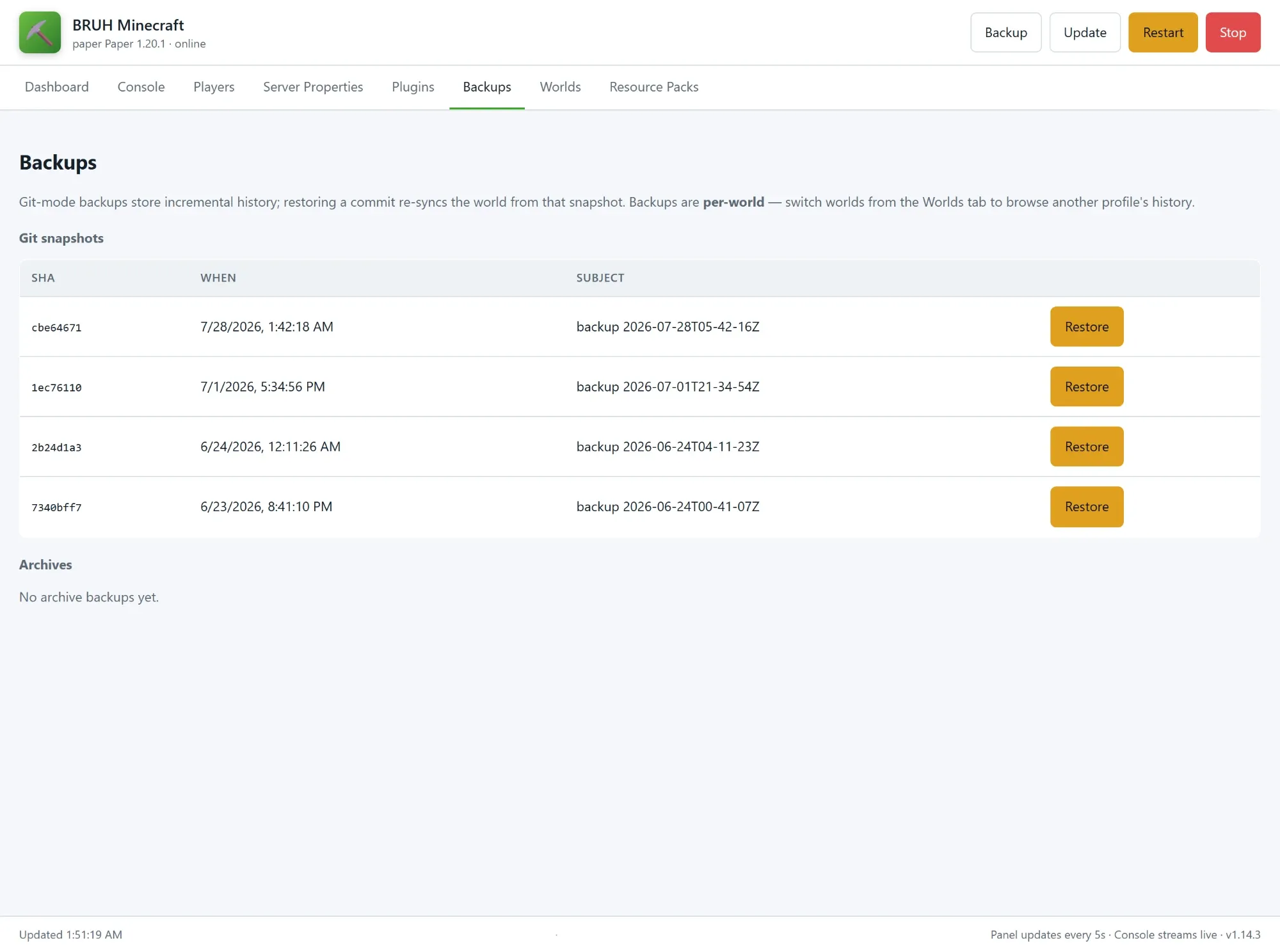
| Option | Default | Notes |
|---|---|---|
auto_backup |
true |
Snapshot the world on a schedule. |
backup_interval_minutes |
60 |
5–1440 |
backup_keep_count |
48 |
1–500. Older snapshots pruned. |
backup_use_git |
true |
true = git repo with deltas, false = tar.gz archives. |
auto_restart_on_crash |
true |
5/5min rate limit. |
auto_restart_schedule |
"" |
Cron format, e.g. "0 4 * * *" for daily 4 AM. For a scheduled restart today, use an HA automation on bruh_minecraft.restart_server — see Automation recipes. |
Connection handling
| Option | Default | Notes |
|---|---|---|
auto_kick_ghost_sessions |
true |
Kicks stale “already connected” sessions over RCON. |
Connection throttle and player idle timeout are per-world server.properties keys — edit them on the panel’s Server Properties tab.
Bedrock cross-play
| Option | Default | Notes |
|---|---|---|
enable_bedrock_support |
true |
Auto-installs Geyser + Floodgate. |
geyser_auth_type |
auto |
auto resolves to offline when the active world’s online-mode is off, else floodgate. Also accepts online and offline directly. |
geyser_mtu |
1400 |
576–1492. Drop to 1200 if iOS hangs on “Connecting…”. |
Plugins
Two ways to install plugins, mix and match freely.
One-click popular plugins (1.4.0+)
Tick a checkbox in the Configuration tab and the add-on resolves a Paper-compatible jar via the Modrinth API on every boot. Bukkit-API only — Paper / Purpur / Folia. Since 1.14.4 resolution is version-aware: the add-on picks the newest build for your server’s Minecraft version (preferring release builds over alpha/beta), and if a plugin has no build for your version it’s skipped with a clear warning rather than installing a jar Paper refuses to load.
Two of the twelve ship on by default — install_viaversion and install_viabackwards — so clients a version ahead of or behind the server can still join. Dependencies auto-enable: ticking install_essentialsx_chat pulls in install_essentialsx, and install_viabackwards pulls in install_viaversion.
| Checkbox | Plugin | What it does |
|---|---|---|
install_essentialsx |
EssentialsX | Homes, warps, kits, /tpa, /repair, basics |
install_essentialsx_chat |
EssentialsXChat | Chat formatting (companion to EssentialsX) |
install_luckperms |
LuckPerms | Modern permissions plugin |
install_worldedit |
WorldEdit | In-game block editing |
install_coreprotect |
CoreProtect | Anti-grief logging + rollback |
install_griefprevention |
GriefPrevention | Golden-shovel claim protection |
install_viaversion |
ViaVersion | Newer clients can join an older server |
install_viabackwards |
ViaBackwards | Older clients can join a newer server |
install_mcmmo |
mcMMO | RPG-style skills (Mining/Woodcutting/Swords) |
install_chestsort |
ChestSort | Left-click outside chest = instantly sorted |
install_veinminer |
VeinMiner | Break one ore → whole vein breaks |
install_spark |
Spark | Server profiler |
Toggling a checkbox off does NOT remove the jar — delete it from the panel’s Plugins tab to remove.
Two kinds of jar are auto-quarantined to plugins/.quarantine/ on boot: duplicates (which make Paper log “Ambiguous plugin name” and randomly disable one copy) and, since 1.14.4, jars built for a newer Minecraft than the server runs — they can never load, and the quarantine manifest says to install a build for your version instead of Paper printing a stack trace every start. Both are controlled by auto_quarantine_duplicates (default true); jars are moved, never deleted — restore one by moving it back.
Custom URL list
For anything not in the curated set:
plugins: - url: https://example.com/Essentials.jar name: Essentials.jar # optional rename - "https://example.com/ViaVersion.jar" # plain URL also worksLoaded for paper / purpur / folia. Bad URLs are skipped with a warning, never block startup. Downloads use If-Modified-Since so unchanged jars don’t re-fetch.
GitHub releases/latest/download/X.jar URLs only resolve when the asset is named exactly X.jar. Versioned filenames like NickNamer-5.15.0.jar need a pinned URL.
Where to browse for more plugins
| Marketplace | Notes |
|---|---|
| Modrinth | The cleanest source for direct download URLs. Used by the one-click checkboxes. |
| Hangar | PaperMC’s official marketplace. ViaVersion, ViaBackwards, ViaRewind, ProtocolLib, PlaceholderAPI live here. |
| SpigotMC | The original Bukkit-plugin marketplace. Some plugins are still SpigotMC-only. |
| BukkitDev | Older but still hosts a few classics. |
Other
| Option | Default | Notes |
|---|---|---|
rcon_password |
auto-generated | Loopback-only at 127.0.0.1:25575. You almost never need to set this. |
enable_ha_integration |
true |
Deploys the bruh_minecraft integration and starts the IPC bridge. |
announce_ha_events |
true |
Announce HA-triggered events in chat with /say. |
log_level |
info |
trace–fatal. |
Ports
| Port | What | Needed? |
|---|---|---|
| 25565/tcp + udp | Minecraft Java Edition. | Yes, for anyone joining from Java. |
| 19132/udp | Minecraft Bedrock, via Geyser. | Only with enable_geyser on — phones, consoles and Windows Bedrock discover the server through it. |
| 24454/udp | Simple Voice Chat. | Only with the voice-chat plugin installed. |
The add-on runs with host networking (Bedrock LAN discovery needs it), so these answer on the host’s own address. The management panel itself is ingress-only — it rides Home Assistant’s login, and its API refuses anything from the LAN that isn’t the Supervisor or loopback.
Recommended presets
Add-on options set the container; gameplay is set per world in the panel’s Server Properties tab (noted below each preset).
Family LAN (no Xbox accounts)
eula: truememory_mb: 4096auto_backup: truebackup_interval_minutes: 30Then in Server Properties for the family world: online-mode=false, difficulty=easy — and op the parents from the Players tab.
Public survival
eula: truememory_mb: 6144auto_backup: truebackup_keep_count: 96Then in Server Properties: online-mode=true, white-list=true, difficulty=hard, prevent-proxy-connections=true. Add a nightly-restart automation on bruh_minecraft.restart_server for long uptimes.
Performance / plugin-heavy
eula: trueserver_type: papermemory_mb: 8192Then in Server Properties: view-distance=8, simulation-distance=6, network-compression-threshold=512.
What’s set where
Since 1.8.0 the split is simple:
- Add-on Configuration tab = install/container level. EULA, active world, server type/version, RAM + JVM flags, RCON password, auto-update, backups, crash-restart, HA integration, Bedrock/Geyser, plugin toggles + URL list, log level.
- Panel → Server Properties tab = gameplay, per world. Each world’s
server.propertiesis seeded with sensible defaults on first boot, then owned by you — edits persist across restarts and travel with the world. - Panel ops/whitelist/bans persist per world. They live in each world’s
ops.json/whitelist.json/banned-players.json. plugins:URLs andinstall_*toggles re-resolve on every boot into the active world’splugins/folder. Deleting a jar from the panel is temporary if its URL/toggle is still set.
Multi-world profiles
Each profile is a full server root at /config/minecraft-worlds/<name>/ with its own world, server.properties, plugins, and backups. Only one is active at a time.
Switch: Panel → Worlds tab → Switch. Writes active_world, full restart, ~30 s.
Per-profile: world files, server.properties, plugins folder, ops/whitelist/bans, backup history.
Shared across profiles: the add-on’s install/container options (server type, memory_mb, backups, Bedrock/Geyser, the plugins: URL list + toggles), RCON password. Gameplay settings — difficulty, gamemode, MOTD, and the rest of server.properties — are per-world.
Import (1.10.0+): the Worlds tab accepts a Minecraft world .zip up to 2 GB. The add-on finds the directory containing level.dat wherever it sits in the zip and stages it as a new switchable profile — then Switch into it.
Featured worlds (1.14.0+)
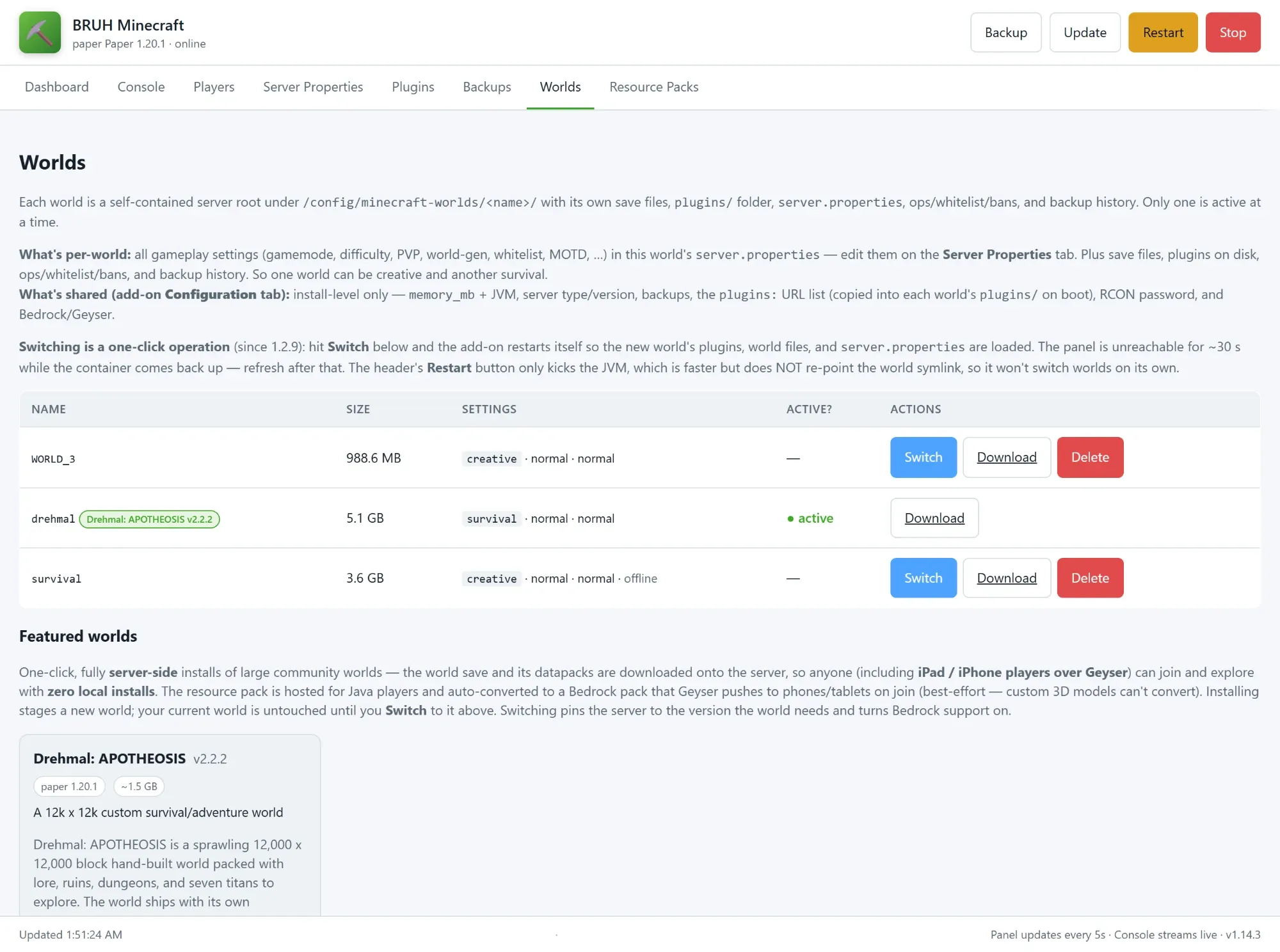
The Worlds tab has a Featured worlds section: curated community worlds installed with one click, hosted entirely server-side so players — including iPads and iPhones on Bedrock via Geyser — just join, with zero local installs. Install downloads the world and its bundled datapacks as a new switchable profile (your current world is untouched), writes its server.properties from the catalog recipe, and converts its resource pack to a Bedrock pack Geyser pushes on join. Switch then pins the server to the software + Minecraft version the world requires and restarts — switching back to your own world may need you to re-pick a version on the Configuration tab.
The headline entry is Drehmal: APOTHEOSIS, a hand-built 12k × 12k adventure world (~1.5 GB download, Minecraft 1.20.1 on Paper). Bedrock players can explore the whole map; vanilla retextures come across in the auto-converted pack, but custom 3D models and animated textures don’t — a Bedrock platform limit, and Drehmal’s optional client-side Fabric mods aren’t required to play.
Offline mode
Since 1.3.0, the server starts even when the HA host has no internet — provided it’s been online at least once to cache the jars.
How it’s detected: at boot, the add-on hits https://api.papermc.io/v2/ with a 5-second timeout. Reachable = online; otherwise the add-on logs a banner and runs in offline mode for the rest of the session.
What gets skipped when offline:
- Server-jar resolution / re-download — the existing
server.jaris reused as-is. - Plugin URL fetches in the
plugins:list — whatever’s already inplugins/keeps loading. - Geyser / Floodgate auto-updates — cached jars are reused.
What still happens offline:
server.propertiesis checked as usual — infrastructure keys (RCON, query, ports) are enforced, your gameplay edits are preserved.- Geyser config (auth-type, MTU, MOTD) is patched on every boot — those edits don’t need network.
- Ops / whitelist / bans, world / backup / panel / RCON, all HA integration plumbing — fully functional.
First-ever boot still needs internet (there’s nothing cached to fall back to). The add-on will log a clear actionable error if you try to start offline with no cached jar:
[download-server] ERROR: offline mode and no cached server.jar exists[download-server] Connect to the internet once so the initial jar can be downloaded;[download-server] subsequent boots will continue to work offline.There’s no config option for this — the behaviour kicks in automatically based on network reachability.
Panel tabs
| Tab | What it does |
|---|---|
| Dashboard | Status, uptime, memory, TPS, online players, quick /say, one-shot RCON. |
| Console | Live colour-coded JVM log via SSE; command input runs over RCON. |
| Players | Op / kick / ban / whitelist with one click. |
| Server Properties | Per-world editor — your edits persist and travel with the world (see What’s set where). |
| Plugins | Install by URL, list with size/mtime, delete. |
| Backups | Git snapshots and archives, one-click restore. Scoped to active profile. |
| Worlds | List, switch, create, import (.zip, up to 2 GB), delete profiles — plus Featured worlds, curated community worlds installed with one click (see below). |
| Resource Packs | Upload a pack .zip (≤ 250 MB); the add-on stores it under /config/resource-packs/, serves it on the LAN, and Apply to active world writes the URL + SHA-1 into that world’s server.properties. |
Header buttons (always visible): Backup • Update • Restart (JVM-only, ~15 s) • Stop (sets no_restart).
Home Assistant entities
Sensors
| Sensor | Notes |
|---|---|
players_online |
players list in attributes |
players_max |
|
tps_1m / tps_5m / tps_15m |
Paper / Purpur / Folia only |
latency_ms / uptime |
|
version / server_type / motd / difficulty / gamemode |
Binary sensors
reachable (status ping ok), rcon_ok (disabled by default).
Buttons
backup_now, restart_server, stop_server, save_all.
Services
# Broadcast to chatservice: bruh_minecraft.saydata: { message: "Dinner's ready — server going down in 2 min" }
# Any RCON commandservice: bruh_minecraft.rcon_commanddata: { command: "weather clear" }
# Give an item to an online playerservice: bruh_minecraft.givedata: { player: "Alice", item: "minecraft:diamond_pickaxe", amount: 1 }
# Lifecycleservice: bruh_minecraft.backup_nowservice: bruh_minecraft.restart_serverservice: bruh_minecraft.stop_server
# Quality-of-lifeservice: bruh_minecraft.set_weather    # data: { weather: clear|rain|thunder }service: bruh_minecraft.set_time       # data: { time: day|night|noon|midnight|"12000" }
# Player management — all take player: "<name>"service: bruh_minecraft.op_playerservice: bruh_minecraft.deop_playerservice: bruh_minecraft.kick_playerservice: bruh_minecraft.ban_playerservice: bruh_minecraft.whitelist_addservice: bruh_minecraft.whitelist_remove
# Notify platform — broadcast as a notify targetservice: notify.bruh_minecraft_broadcastdata: { message: "Doorbell rang!" }
Automation recipes
# Nightly backup at 4 AMautomation:  - trigger: { platform: time, at: "04:00:00" }    action: { service: bruh_minecraft.backup_now }
# Nightly restart at 4:30 AM (helps long-uptime memory creep)automation:  - trigger: { platform: time, at: "04:30:00" }    action: { service: bruh_minecraft.restart_server }
# Auto-stop when idle for 30 minutesautomation:  - trigger:      platform: numeric_state      entity_id: sensor.bruh_minecraft_players_online      below: 1      for: "00:30:00"    action: { service: bruh_minecraft.stop_server }
# Bedtime kickautomation:  - trigger:      platform: numeric_state      entity_id: sensor.bruh_minecraft_players_online      above: 0    condition: { condition: time, after: "22:30:00", before: "06:00:00" }    action:      - service: bruh_minecraft.say        data: { message: "Server going to sleep in 60s — save your work!" }      - delay: "00:01:00"      - service: bruh_minecraft.stop_server
Security (1.15.0+)
The add-on rates 6/6 in the add-on store:
- The management panel only answers requests that arrive through Home Assistant. The add-on runs with host networking (Bedrock LAN discovery needs it), which puts the panel’s port on your network — so since 1.15.0 it refuses any connection that isn’t from the Supervisor or loopback, judged by the connection’s own peer address. Opening
http://<HA-host>:8099directly gets nothing, by design; refusals are logged. Two paths stay public because they must be:/pack/<name>(Minecraft clients fetch resource packs from it) and/api/health(liveness only). - AppArmor is on. The profile lets the JVM do JVM things and denies the host-escape set — it matters here because plugin jars run with the server’s full authority.
- A watchdog polls
/api/healthand restarts a hung panel. - The generated RCON password and console log are excluded from HA backups. Your worlds and world backups still go in — those are the point of backing this add-on up.
Where data lives
| Path | Contents |
|---|---|
/config/minecraft/ |
Symlink to the active profile |
/config/minecraft-worlds/<profile>/ |
Full server root per profile |
/config/minecraft-backups/<profile>/ |
Git snapshots or tar.gz archives |
/config/resource-packs/ |
Uploaded resource packs, served to players from the panel |
/config/.bruh_minecraft/ |
HA bridge — request/response queues, stats |
/config/custom_components/bruh_minecraft/ |
Companion integration |
/data/server-cache/ |
Cached jars (content-addressed) |
/data/panel/ |
Panel state, RCON secret, console log |
Troubleshooting
Won’t start
| Symptom | Fix |
|---|---|
EULA has NOT been accepted |
eula: true. |
address already in use: 25565 |
Stop the conflicting process or remap the port. |
| Plugin install warning then continues | Bad URL — fix or remove from plugins:. |
| One-click plugin didn’t appear | No Modrinth build exists for your server’s Minecraft version — the log says which plugin was skipped and why. |
Connection issues
| Symptom | Fix |
|---|---|
| Can’t connect from internet | Forward 25565/tcp + 25565/udp (and 19132/udp for Bedrock) to HA host. Never forward 8099 — the panel refuses direct callers anyway. |
Panel does nothing when opened by IP (<HA-host>:8099) |
By design since 1.15.0 — the panel only answers through Home Assistant. Open it from the sidebar; refusals show in the add-on log. |
| “Please log into Xbox” | Set the world’s online-mode=false (panel → Server Properties). |
| iOS hangs on “Connecting…” | geyser_mtu: 1200. |
| “You are already connected” | Auto-kicker should clear it; manual kick from Players tab. |
| Bedrock not in Friends tab | Same subnet/VLAN as HA host? Try manual <HA IPv4>:19132. |
Performance
| Symptom | Fix |
|---|---|
| TPS sensors null | TPS only reported by Paper / Purpur / Folia. |
| OOM crashes | Bump memory_mb. |
| Sagging TPS | Lower view_distance (8) and simulation_distance (6). A nightly-restart automation on bruh_minecraft.restart_server helps with memory creep. |
Diagnostics
Bump log_level: debug and reproduce. Check the Log tab for boot/supervisor errors and the panel’s Console tab for live JVM output. Full historical JVM log: /data/panel/console.log.
File issues at https://github.com/bruhautomation/BRUH-HA-Apps/issues.